What Happened When I Built an Internal Event RSVP Agent
This build was for internal staff, not donors or constituents directly. While a staff member is on the phone with a donor or answering an email, the agent checks event capacity in Salesforce and confirms or declines an RSVP. I built the Salesforce Flow first and connected it as a standard Agent Action, rather than letting Agentforce Builder auto-scaffold a connection to Data Cloud on its own.
Building Using Data Cloud First
I started this build connecting directly to Data Cloud because I wanted to use live data. Partway through, a data lapse surfaced between Data Cloud's batch sync and the live Salesforce record, resulting in the Agent responding with older RSVP data. I switched the Flow to read straight from the Salesforce Object instead. Everything in the Setting up Data Cloud section below is unused by the final agent. I'm keeping it in this post anyway, since the sync-lag is worth knowing before you hit it yourself.
Creating an Event Custom Object

Figure 1: I created a custom object, Event__c, with the custom fields: Capacity, RSVP Count, and Event Date.
Setting up Data Cloud
First, I had to set up a data stream and choose a data source. I used Salesforce CRM instead of a manual file upload, to work against live data.
I set the Object Category on the Event__c_Home data stream to Other. Data Cloud asks you to classify every object as one of three types: Profile (identity data, like a person), Engagement (a timestamped behavioral log, like an email open), or Other (everything else). Since, Event__c is neither a person nor a log of something happening at a moment in time, Other is the right fit.

Figure 2: The orange warning states that the category can't be changed after saving. Locked for good once saved: the only fix is deleting the data stream and rebuilding it. A known trap, flagged in Data Cloud setup guides.
Deploying the data stream created a Data Lake Object automatically, Event__c_Home. A DLO can't be queried by a Flow or an agent directly. It has to be mapped into a Data Model Object first. Fourteen of seventeen DLO fields mapped automatically, one to one.

Figure 3: Manage mapping dialog on the Capacity field, confirming the auto-mapped one-to-one relationship. Mappings can be deleted and rebuilt individually, field by field, if one ever needs adjusting.
I created two Event__c Salesforce Object test records:
Fall Fundraiser Gala, Capacity 50, RSVP Count 12
Volunteer Appreciation Lunch, Capacity 10, RSVP Count 10, already full


Figure 4: The DMO showed zero total records. The cause: the data stream hadn't synced yet. Clicking Refresh Now and choosing Incremental Refresh brought Total Records to 2.
Building the Flow
I built a Get Records element, pointed at the DMO, filtering on event name, inside an autolaunched Flow called Check Event Capacity. Finding the DMO's API name took a few tries; it needed a moment to finish indexing.
I created a Text variable, eventNameInput, meant to hold the event name passed in from the agent. I marked it "Available for input" at creation, so that it would be available to the Agent.
I added a Decision element, "Has Capacity?", checking whether RSVP Count was less than Capacity. If you are used to Salesforce objects, DMO field names on this object double up the custom-field suffix: RSVP_Count__c in Salesforce vs RSVP_Count_c__c on the DMO. Tip: Use the field picker to surface the real name.
I activated the Flow. (Activation is required before Agentforce Builder accepts it as an Agent Action.)

Figure 5: This was the first iteration of the flow. It writes to the record on every successful capacity check, with no separate step for checking vs confirming an RSVP. That turned out to be an issue because any question where the event had open capacity was logged as an RSVP. Later in this build, I removed the Update Records element from this Flow and split it into two separate Flows, one read-only for checks, one that writes only after an explicit confirmation.
Building the Agent
Creating the agent's user record failed on the first attempt: "We couldn't assign the agent user. Check to see if you reached the user limit for your org." Since licenses are limited, I deactivated an old, unused agent's user record to free a slot, and created a new one instead.
Prompt:
Build an agent for internal staff to help donors and constituents RSVP to events. When someone asks to RSVP for a named event, check that event's remaining capacity using the "Check Event Capacity" flow action, and either confirm their RSVP if there's room, or let them know the event is full if it isn't. Always ask for the specific event name if it isn't provided. Do not guess or invent event details, capacity, or RSVP status, rely only on what the flow action returns. If the event can't be found, or the request is about anything other than RSVPing to a named event, escalate to the default Escalation topic.
I've updated the following sections:
system: Focused the assistant on internal staff support for RSVPs to named events; emphasized never inventing details and relying only on the Check Event Capacity flow results.
config: Set the description to indicate it's an internal staff assistant for event RSVPs.
variables: Added event_name, capacity_remaining, and event_found to support RSVP logic.
agent_router (start_agent): Routes RSVP intents to rsvp_event and all other/non-RSVP cases to Escalation.
subagent escalation: Simplified to a default escalation handoff per org routing.
subagent rsvp_event (added): Implements the RSVP flow, including prompting for missing event_name, calling the capacity check, confirming when capacity is available (with local-only decrement), and escalating when the event is not found or is full.
Notes on actions: flow_check_event_capacity is added as a placeholder for your Flow named "Check Event Capacity" because it isn't listed in the available action catalog. Please replace the placeholder target with the actual Flow target when available.
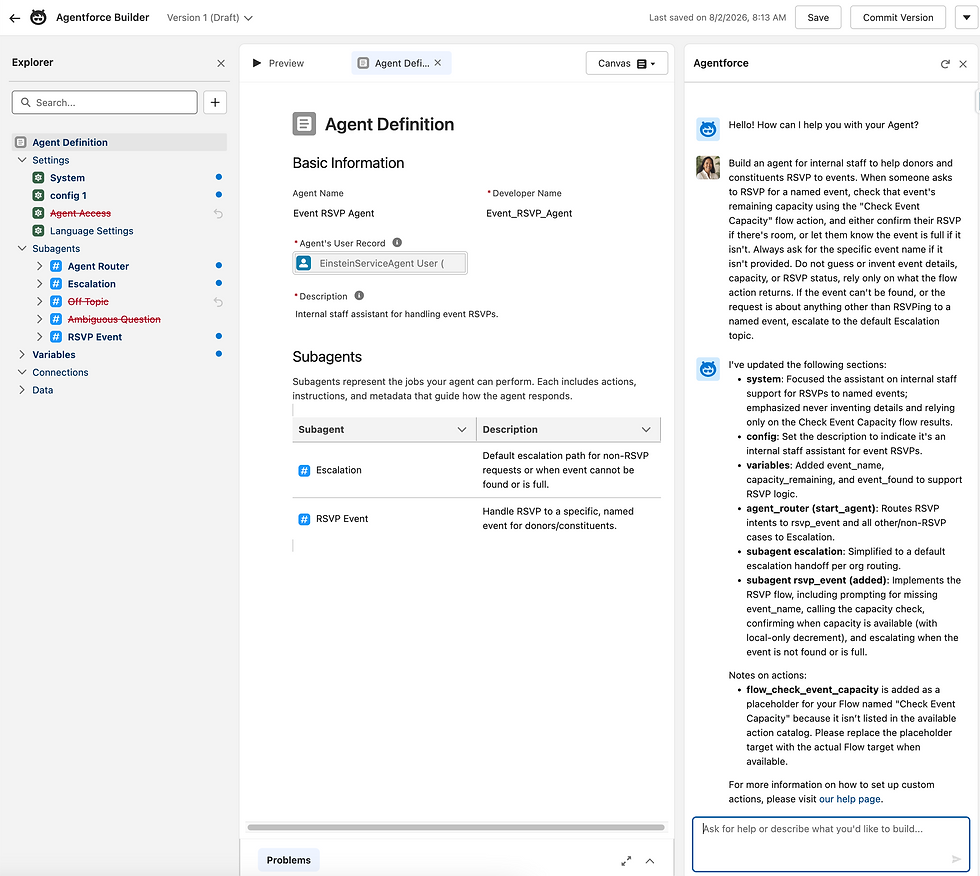
Figure 6: Agent Access (Settings), Off Topic, Ambiguous Question (Subagents): all struck through in the Explorer, removed by the build.
The placeholder Flow action wasn't connected to my real Flow, because the Flow wasn't registered as an available action when the build prompt ran. Using the Flow's exact name in the prompt would not have prevented this. The builder wasn't matching a name wrong; it was searching a catalog that didn't contain the Flow.
I had to create the real action manually: "Create a custom action" > Reference Action Type: Flow. I searched for and selected the actual Check Event Capacity Flow. That left two entries sitting under RSVP Event at the same time.

Figure 7: Both actions exist under RSVP Event, the invented placeholder and the real Check Event Capacity.

Figure 8: Both check_event_capacity (dotted, placeholder) and Check Event Capacity (real) still listed under Actions Available For Reasoning. I corrected the subagent's Reasoning Instructions "Run" step to point at the real action instead of the placeholder, then deleted the placeholder entirely rather than leaving it disconnected.
Fixing the empty Outputs
With the real action in place, a new problem showed up. The Outputs section read "No reference action selected," even though the Reference Action field right above it showed Check Event Capacity selected, Flow: Active.

Figure 9: Reference Action correctly set, but action outputs were still empty.
Our Flow design had never defined explicit output variables. Get Records stores its result into an internal record variable automatically, but Agentforce Builder needs dedicated Flow variables, each marked available for output, before it can expose anything to the agent.
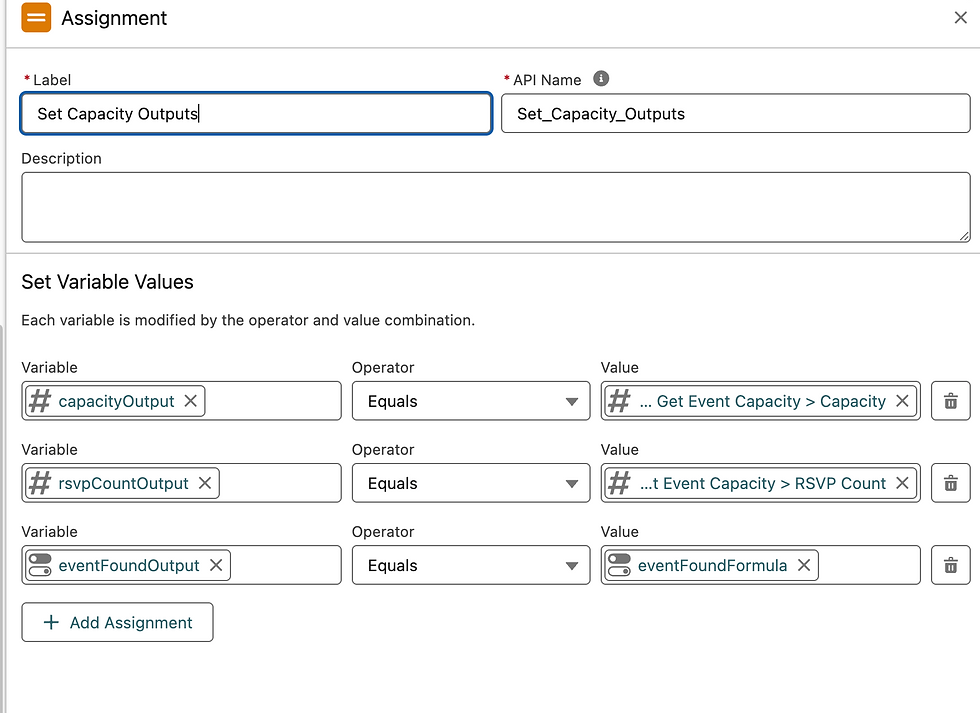
Figure 10: I created three Flow variables: capacityOutput, rsvpCountOutput, eventFoundOutput, each marked available for output. The third needed a formula, since Get Records doesn't produce a plain true or false on its own. Formula: NOT(ISBLANK({!Get_Event_Capacity.Id__c})).
Outputs still read "No reference action selected." In order to fix you need to clear the action's Reference Action field entirely re-select Check Event Capacity from scratch. All three outputs populated immediately.
Takeaway: the action output's schema is snapshotted at creation time. Resaving the Flow doesn't update that snapshot. You must refresh Reference Action.
Testing the agent
During testing, one response reported fewer RSVPs than the record actually had. The agent said 14; the real record showed 15. The cause: Get Records was reading from a Data Cloud copy of the record that only updates on a batch schedule, not the live Salesforce data itself, so it was reporting a number that hadn't caught up yet.

Figure 11: The event record showed 15 RSVPs while the agent's response cited 14.
This is where I fixed the Flow from the original architecture: trying to read from Data Cloud. I pointed Get Records at the Salesforce Object instead of Data Cloud's copy of the record, so it would always read the live, current data; because Data Cloud refreshes at intervals.
The write, Update Records, was always pointed at the Salesforce Object. Tip: Data Cloud's Salesforce Connector sync only flows one direction, Salesforce into Data Cloud.
Another thing to note is that Agents are Users, and they therefore need permissions like any other User. This critical core functionality acts as a guardrail to prevent exposing unwanted data in an Agent response.

Figure 12: Agents need permissions just like any other user. This is a main lever for the admin to control what data an agent can see or change.
As a Flow architecture flaw, I found capacity_remaining had never been a true remaining-seats calculation. It was a passthrough of raw total capacity, never subtracted against the RSVP count. So, I added capacityRemainingOutput, a subtraction formula: capacity minus RSVP count: {!Get_Event_Capacity.Capacity__c} - {!Get_Event_Capacity.RSVP_Count__c}

Figure 13: The fully fixed RSVP Event Reasoning Instructions, (If) input connected to event_name, (Run) four distinct output variables, (Else) response text rewritten to cite real numbers. Take note, for the next section, that (Run) is happening automatically under the first (If).
Another Fix During Testing
The agent called Check Event Capacity with an empty event name and escalated.
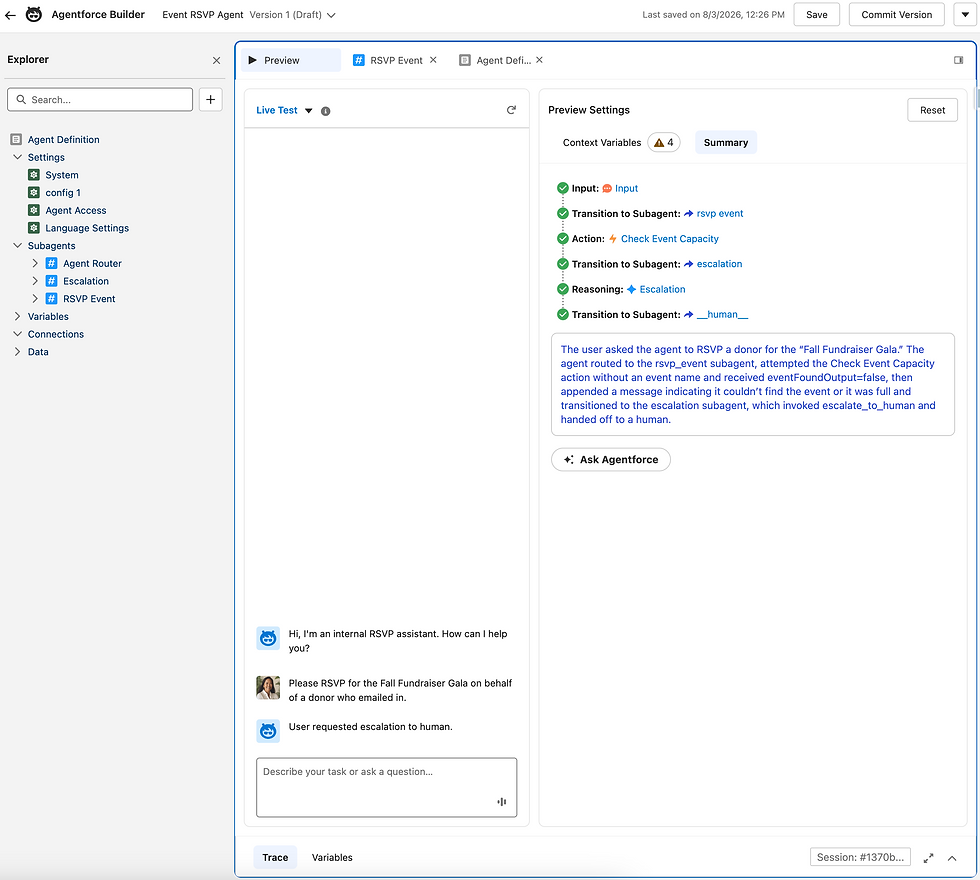
Figure 14: The summary states the "Check Event Capacity action ran without an event name and returned eventFoundOutput=false". This resulted in "User requested escalation to human."
The flow was sending data into the agent before it had a chance to use it's reasoning step, feeding the agent a blank name.
The fix was removing the automatic check entirely (Run statement), and letting the assistant rely only on its own judgment to look up capacity once it actually knew which event was being asked about.

Figure 15: RSVP Event subagent after the fix. With the automatic trigger removed, Check Event Capacity and Confirm RSVP are both listed as tools the assistant can choose to use, not steps that fire on their own.
Fixing the Flow Write Order
Further testing showed that after a confirmed RSVP, the numbers reported back still showed the seat count from before that RSVP was added. The step that reports numbers back to the assistant was running before the record itself got updated. That needed fixing.
To fix this issue, I built a second Assignment element, called Set Final Capacity Outputs. I placed it right after Increment RSVP Count, the step that writes the new RSVP total to the record. This Assignment runs after the write, so it reads the real, updated count, using its own formula resource, capacityRemainingFormulaPostWrite, to recalculate remaining seats.
{!Get_Event_Capacity.Capacity__c} - {!newRSVPCount}

Figure 16: The Flow canvas, second Assignment after Update Records.
Activated and re-tested to successful outcome. The data on the record moved from 19 to 20. Response stated 30 of 50 seats remaining with twenty RSVPs confirmed, matching the real, post-write state.
Reviewing Escalation
I now moved on to review the Escalation Subagent.

Figure 17: I found one Reasoning Instruction, "Hand off to the default Escalation topic/system per org routing," and one Action Available for Reasoning, escalate_to_human; auto-generated by the original prompt.
This agent is built for internal staff. The person typing into the agent is already the human the "escalate to a human" path is meant to hand off to, so it's not necessary here. I rewrote the language: one message for the not-found-or-full case, a separate one for anything outside RSVP handling. Then I removed the human-handoff action entirely.

Figure 18: Instead of relying on that automatic action, I wrote out exactly what the assistant should say in plain instructions: one message for when an event can't be found or is full, another for anything outside RSVPs entirely.
Further Testing
I ran this test into the agent: "check capacity for the Fall Fundraiser Gala, I have someone who wants to attend." The agent responded: "The Fall Fundraiser Gala currently has 28 out of 50 seats remaining, with 22 RSVPs confirmed so far. Would you like me to reserve a spot for your guest now? If so, please provide their name or any additional details needed for the RSVP."
This surfaced two problems:
Check-vs-Confirm: The count already moved from 21 to 22, before anyone confirmed.
The agent asks to provide their name.
Check-vs-Confirm
Because nothing in the Flow distinguished checking from confirming, this inquiry got treated exactly like a confirmed RSVP, and the record got written anyway.
I fixed this by splitting the Flow into two. The original, Check Event Capacity, became read-only on both branches. A new duplicate, Confirm RSVP, kept the write path. I rewrote the instructions so Check Event Capacity handles anything short of a confirmation, and Confirm RSVP only runs once the user explicitly says yes.

Figure 19: RSVP Event with both actions now listed side by side, Check Event Capacity and Confirm RSVP, each with its own inputs and outputs mapped out separately.
The Agent Asks To Provide Their Name
I fixed this by adding an instruction telling the assistant not to ask for or offer to collect the attendee's name or any other personal details.

Figure 20: The instruction added directly to Reasoning Instructions: "Do not ask for or offer to collect the attendee's name or other personal details, this system does not store attendee information, only event-level capacity and RSVP counts."
Final test matrix
Each row below is the message sent and the agent's response.
1a. Inquiry, real event with room.
Sent: "Check capacity for the Fall Fundraiser Gala, I have someone who wants to attend."
Got back: "The Fall Fundraiser Gala currently has 28 out of 50 seats remaining, with 22 RSVPs confirmed so far. Would you like to reserve a spot for your attendee?"
1b. Confirmation, follow-up, same session.
Sent: "Yes, please go ahead and confirm it."
Got back: "Your RSVP for the Fall Fundraiser Gala is confirmed. There are now 27 out of 50 seats remaining, with 23 RSVPs confirmed."
2. Explicit RSVP, new session.
Sent: "Please RSVP for the Fall Fundraiser Gala on behalf of a donor who emailed in."
Got back: "The RSVP for the Fall Fundraiser Gala has been confirmed. There are now 26 out of 50 seats remaining, with 24 RSVPs confirmed so far."
3. Inquiry against a full event, new session.
Sent: "Check capacity for the Volunteer Appreciation Lunch."
Got back: "I couldn't find that event, or it's already at capacity. Double-check the event name, or let me know if you'd like me to check a different one."
4. Explicit RSVP against a full event, new session.
Sent: "Please RSVP for the Volunteer Appreciation Lunch on behalf of a donor."
Got back: "I couldn't find that event, or it's already at capacity. Double-check the event name, or let me know if you'd like me to check a different one."
5. Explicit RSVP against a nonexistent event, new session.
Sent: "Please RSVP for the Winter Gala on behalf of a donor."
Got back: "I couldn't find that event, or it's already at capacity. Double-check the event name, or let me know if you'd like me to check a different one."
6. Out-of-scope request, new session.
Sent: "Can you tell me our donor retention rate for this quarter."
Got back: "I can only help with RSVPs to specific, named events. That request is outside what I handle. How can I assist you with an event RSVP today?"
7. Missing event name, new session.
Sent: "I'd like to RSVP someone for an event."
Got back: "Could you provide the exact event name for the RSVP? I need the specific event name to continue."
All eight passed. There are further enhancements which we could make to this agent.


Comments